Many people struggle with setting up ASP.NET Core behind load-balancers and reverse-proxies. This is due to the fact that Kestrel is often used just for serving up the application, whereas the “real HTTP traffic” is happening one hop earlier. IOW the ASP.NET Core app is actually running on e.g. http://localhost:5000 – but the incoming traffic is directed at e.g. https://myapp.com.
This is an issue when the application needs to generate links (e.g. in the IdentityServer4 discovery endpoint).
Microsoft hides the problem when running in IIS (this is handled in the IIS integration), and for other cases recommends the forwarded headers middleware. This middleware requires some more understanding how the underlying traffic forwarding works, and its default configuration does often not work for more advanced scenarios.
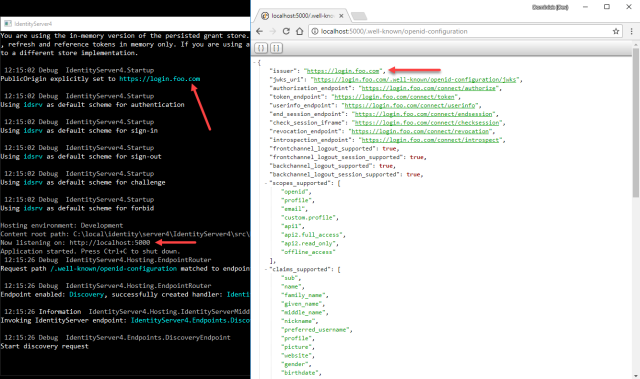
Long story short – we added a shortcut (mostly due to popular demand) to IdentityServer that allows hard-coding the public origin – simply set the PublicOrigin property on the IdentityServerOptions. See the following screenshot where I configured the value https://login.foo.com – but note that Kestrel still runs on localhost.
HTH